# Cross-Symbol & Multi-Timeframe
`request.security()` evaluates an expression in the context of a different
symbol and/or timeframe, and returns the result aligned to the current chart
bar. It is the primary way to access multi-timeframe (MTF) data and data from
other instruments in Navi.
## Basic Syntax
```navi
request.security(symbol, timeframe, expression, gaps, lookahead, ignore_invalid_symbol, currency, calc_bars_count)
```
| Parameter | Type | Description |
|---|---|---|
| `symbol` | `String` | Symbol identifier, e.g. `"NASDAQ:AAPL"` or `syminfo.tickerid` |
| `timeframe` | `String` | Timeframe string, e.g. `"D"`, `"W"`, `"60"` |
| `expression` | any series | Expression evaluated on the requested symbol/timeframe |
| `gaps` | `BarmergeGaps` | `BarmergeGaps.Off` (default): carry last value forward; `BarmergeGaps.On`: emit `na` between confirmations |
| `lookahead` | `BarmergeLookahead` | `BarmergeLookahead.Off` (default) or `BarmergeLookahead.On` |
| `ignore_invalid_symbol` | `bool` | If `true`, return `na` instead of error for unknown symbols |
| `currency` | `String` | Currency for price conversion |
| `calc_bars_count` | `int` | Optional positive limit for how much recent request history is loaded |
## Simple Examples
### Higher timeframe close
```navi
indicator("Weekly Close on Daily Chart", overlay: true);
let weekly_close = request.security(syminfo.tickerid, "W", close);
plot(weekly_close, "Weekly Close", color: color.BLUE);
```
### Another symbol
```navi
indicator("SPY on AAPL chart", overlay: false);
let spy_close = request.security("AMEX:SPY", "D", close);
plot(spy_close);
```
### Higher timeframe indicator
```navi
indicator("Weekly RSI");
let weekly_rsi = request.security(syminfo.tickerid, "W", ta.rsi(close, 14));
plot(weekly_rsi);
hline(70);
hline(30);
```
## Timeframe Strings
| String | Meaning |
|---|---|
| `"1"`, `"5"`, `"15"`, `"60"` | Minutes |
| `"D"` | Daily |
| `"W"` | Weekly |
| `"M"` | Monthly |
| `"3M"`, `"6M"` | Multi-month |
Use `timeframe.period` to reference the chart's own timeframe.
## `calc_bars_count`
Use `calc_bars_count` when a request only needs a short recent window.
- A positive value asks the provider for at most that many recent bars for the requested stream.
- `na` keeps the stream uncapped.
```navi
let recent_weekly = request.security(syminfo.tickerid, "W", close, calc_bars_count: 2);
```
## Gaps
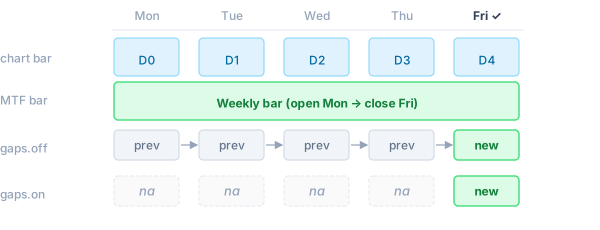
When the requested timeframe is higher than the chart timeframe, a new higher-TF
bar closes less frequently than the chart advances.
- **`BarmergeGaps.Off`** (default): the last known value is carried forward — the series
has no `na` values between higher-TF bar closes.
- **`BarmergeGaps.On`**: a `na` is emitted for every chart bar where the higher-TF bar
has not yet closed.
 ```navi
// Off (default): weekly_close carries forward — always defined
let weekly_close = request.security(syminfo.tickerid, "W", close);
// On: na on every day except when the weekly bar closes
let weekly_close_gaps = request.security(syminfo.tickerid, "W", close, gaps: BarmergeGaps.On);
```
## Lookahead
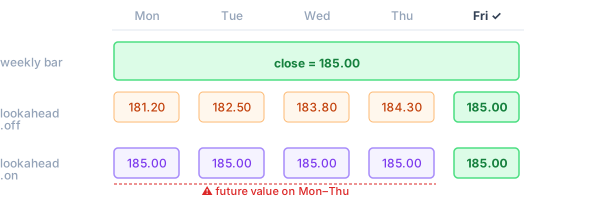
`BarmergeLookahead.On` makes the expression see the **final value** of the higher-TF bar
from the very first chart bar within that period, rather than the still-forming
value. This can introduce future leak into historical bars — only use it when
intentional.
```navi
// Off (default): weekly_close carries forward — always defined
let weekly_close = request.security(syminfo.tickerid, "W", close);
// On: na on every day except when the weekly bar closes
let weekly_close_gaps = request.security(syminfo.tickerid, "W", close, gaps: BarmergeGaps.On);
```
## Lookahead
`BarmergeLookahead.On` makes the expression see the **final value** of the higher-TF bar
from the very first chart bar within that period, rather than the still-forming
value. This can introduce future leak into historical bars — only use it when
intentional.
 ```navi
// Default: sees the forming weekly close (updates throughout the week)
let weekly_open = request.security(syminfo.tickerid, "W", open);
// With lookahead: sees the confirmed weekly open immediately on Monday
let weekly_open_confirmed = request.security(syminfo.tickerid, "W", open, lookahead: BarmergeLookahead.On);
```
## `var` and `varip` Variables
`var` and `varip` variables cannot be declared inside the `expression` argument.
To accumulate state across bars on the **requested** timeframe, declare the
variable at the top level of the script. The sub-instance runs the full program
body on the requested symbol/timeframe, so top-level `var` state is maintained
per call site independently of the main chart:
```navi
indicator("Cumulative Volume (Weekly)");
// Declared at top level — the sub-instance accumulates this on weekly bars
var cum: float = 0.0;
cum += volume;
let weekly_cum_vol = request.security(syminfo.tickerid, "W", cum);
plot(weekly_cum_vol);
```
Each `request.security` call site has an isolated sub-instance — its `var`
state is independent of the main script and of other `request.security` calls.
## Tuples
An expression can return multiple values as a tuple:
```navi
indicator("Weekly OHLC");
let (w_open, w_high, w_low, w_close) =
request.security(syminfo.tickerid, "W", (open, high, low, close));
plot_candle(w_open, w_high, w_low, w_close);
```
## `ignore_invalid_symbol`
Use this flag when the symbol might not exist in the data provider:
```navi
let price = request.security("SOME:SYMBOL", "D", close, ignore_invalid_symbol: true);
// price is na if the symbol is not recognised; no runtime error is raised
```
Without this flag, an unrecognised symbol raises a runtime error and halts
execution.
## `request.security_lower_tf`
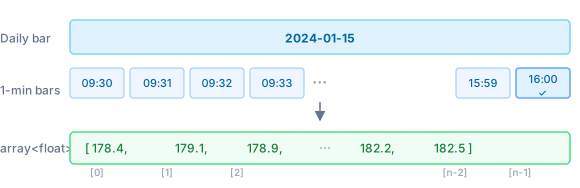
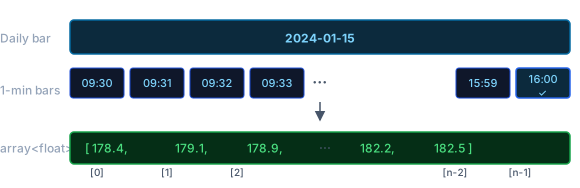
For lower timeframes, use `request.security_lower_tf`. It returns an
`Array` containing every sub-bar value within the current chart bar,
in ascending order:
```navi
// Default: sees the forming weekly close (updates throughout the week)
let weekly_open = request.security(syminfo.tickerid, "W", open);
// With lookahead: sees the confirmed weekly open immediately on Monday
let weekly_open_confirmed = request.security(syminfo.tickerid, "W", open, lookahead: BarmergeLookahead.On);
```
## `var` and `varip` Variables
`var` and `varip` variables cannot be declared inside the `expression` argument.
To accumulate state across bars on the **requested** timeframe, declare the
variable at the top level of the script. The sub-instance runs the full program
body on the requested symbol/timeframe, so top-level `var` state is maintained
per call site independently of the main chart:
```navi
indicator("Cumulative Volume (Weekly)");
// Declared at top level — the sub-instance accumulates this on weekly bars
var cum: float = 0.0;
cum += volume;
let weekly_cum_vol = request.security(syminfo.tickerid, "W", cum);
plot(weekly_cum_vol);
```
Each `request.security` call site has an isolated sub-instance — its `var`
state is independent of the main script and of other `request.security` calls.
## Tuples
An expression can return multiple values as a tuple:
```navi
indicator("Weekly OHLC");
let (w_open, w_high, w_low, w_close) =
request.security(syminfo.tickerid, "W", (open, high, low, close));
plot_candle(w_open, w_high, w_low, w_close);
```
## `ignore_invalid_symbol`
Use this flag when the symbol might not exist in the data provider:
```navi
let price = request.security("SOME:SYMBOL", "D", close, ignore_invalid_symbol: true);
// price is na if the symbol is not recognised; no runtime error is raised
```
Without this flag, an unrecognised symbol raises a runtime error and halts
execution.
## `request.security_lower_tf`
For lower timeframes, use `request.security_lower_tf`. It returns an
`Array` containing every sub-bar value within the current chart bar,
in ascending order:
 ```navi
indicator("Intraday highs on Daily chart");
// Returns an array of all 1-minute highs within each daily bar
let minute_highs = request.security_lower_tf(syminfo.tickerid, "1", high);
// Highest 1-minute high within the current daily bar
let intraday_high = minute_highs.max();
plot(intraday_high);
```
The array is empty (`minute_highs.size() == 0`) for bars where no sub-bars are
available.
## Ticker Expressions
A ticker expression is a string that combines multiple symbols using arithmetic
operators. Navi decomposes it into individual `DataProvider` requests, evaluates
the expression per bar, and returns the result as a single series.
### Supported operators
| Operator | Example | Result |
|---|---|---|
| `*` | `"AAPL*2"` | symbol value × scalar |
| `/` | `"AAPL/SPY"` | ratio between two symbols |
| `+` | `"AAPL+MSFT"` | sum of two symbols |
| `-` | `"AAPL-MSFT"` | difference of two symbols |
Operands can be symbol strings (`"EXCHANGE:TICKER"`) or numeric literals.
Standard operator precedence applies; use parentheses if needed.
### Examples
**Weighted blend (50/50 portfolio)**
```navi
let blend = request.security("NASDAQ:AAPL*0.5+AMEX:SPY*0.5", "D", close);
```
**Relative performance (ratio)**
```navi
// AAPL price relative to SPY — how many SPY shares does one AAPL buy?
let ratio = request.security("NASDAQ:AAPL/AMEX:SPY", "D", close);
plot(ratio);
```
**Spread (difference)**
```navi
// Gold/Silver spread
let spread = request.security("COMEX:GC1!/COMEX:SI1!", "D", close);
plot(spread);
```
**Multi-symbol index**
```navi
// Equal-weight average of four tech stocks
let tech = request.security(
"NASDAQ:AAPL*0.25+NASDAQ:MSFT*0.25+NASDAQ:GOOGL*0.25+NASDAQ:AMZN*0.25",
"D",
close
);
plot(tech);
```
### How it works
For an expression like `"AAPL*0.5+SPY*0.5"`, Navi:
1. Extracts each symbol (`AAPL`, `SPY`) and fetches their candlestick data via `DataProvider`.
2. On each bar, evaluates the arithmetic expression using the requested `expression` field (e.g. `close`) from each symbol's sub-instance.
3. Returns the computed scalar result aligned to the chart bar.
Each symbol in the expression is subject to the same `max_security_calls` limit as a regular `request.security` call.
## Limitations
- **Nesting depth**: by default, an expression inside `request.security` may
itself call `request.security` up to 3 levels deep (configurable via
`ExecutionLimits::max_security_depth`).
- **Call site limit**: each unique `(symbol, timeframe)` pair counts toward
`ExecutionLimits::max_security_calls` (default 40).
```navi
indicator("Intraday highs on Daily chart");
// Returns an array of all 1-minute highs within each daily bar
let minute_highs = request.security_lower_tf(syminfo.tickerid, "1", high);
// Highest 1-minute high within the current daily bar
let intraday_high = minute_highs.max();
plot(intraday_high);
```
The array is empty (`minute_highs.size() == 0`) for bars where no sub-bars are
available.
## Ticker Expressions
A ticker expression is a string that combines multiple symbols using arithmetic
operators. Navi decomposes it into individual `DataProvider` requests, evaluates
the expression per bar, and returns the result as a single series.
### Supported operators
| Operator | Example | Result |
|---|---|---|
| `*` | `"AAPL*2"` | symbol value × scalar |
| `/` | `"AAPL/SPY"` | ratio between two symbols |
| `+` | `"AAPL+MSFT"` | sum of two symbols |
| `-` | `"AAPL-MSFT"` | difference of two symbols |
Operands can be symbol strings (`"EXCHANGE:TICKER"`) or numeric literals.
Standard operator precedence applies; use parentheses if needed.
### Examples
**Weighted blend (50/50 portfolio)**
```navi
let blend = request.security("NASDAQ:AAPL*0.5+AMEX:SPY*0.5", "D", close);
```
**Relative performance (ratio)**
```navi
// AAPL price relative to SPY — how many SPY shares does one AAPL buy?
let ratio = request.security("NASDAQ:AAPL/AMEX:SPY", "D", close);
plot(ratio);
```
**Spread (difference)**
```navi
// Gold/Silver spread
let spread = request.security("COMEX:GC1!/COMEX:SI1!", "D", close);
plot(spread);
```
**Multi-symbol index**
```navi
// Equal-weight average of four tech stocks
let tech = request.security(
"NASDAQ:AAPL*0.25+NASDAQ:MSFT*0.25+NASDAQ:GOOGL*0.25+NASDAQ:AMZN*0.25",
"D",
close
);
plot(tech);
```
### How it works
For an expression like `"AAPL*0.5+SPY*0.5"`, Navi:
1. Extracts each symbol (`AAPL`, `SPY`) and fetches their candlestick data via `DataProvider`.
2. On each bar, evaluates the arithmetic expression using the requested `expression` field (e.g. `close`) from each symbol's sub-instance.
3. Returns the computed scalar result aligned to the chart bar.
Each symbol in the expression is subject to the same `max_security_calls` limit as a regular `request.security` call.
## Limitations
- **Nesting depth**: by default, an expression inside `request.security` may
itself call `request.security` up to 3 levels deep (configurable via
`ExecutionLimits::max_security_depth`).
- **Call site limit**: each unique `(symbol, timeframe)` pair counts toward
`ExecutionLimits::max_security_calls` (default 40).